
An automated accessibility checker, which checks for text and formatting problems, is one of the tools provided in the Atto editor.
- Images have insufficient alt text (Refer to this article for: Adding Alt Text to Images)
- The contrast between the text color and the backdrop color is within the WCAG AA requirements.
- Long blocks of text are adequately divided by headings.
- Captions are used on all tables.
- Merged cells in tables are avoided since they are difficult to navigate with screen readers.
- Row or column headings are present in all tables.
1. Navigate to the Moodle activity for which you want to use the Accessibility checker
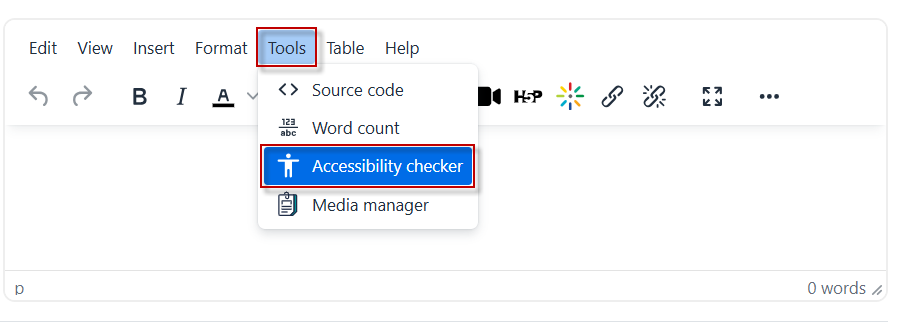
2. Go to the Text editor, click Tools , and then select Accessibility checker.

This work by Kwantlen Polytechnic University (KPU) is licensed under a Creative Commons Attribution-NonCommercial 4.0 International License.